跨100+ AWS账户的集中CloudTrail监控
DataHot 速览
AWS Big Data Blog 介绍了如何在 Amazon OpenSearch Service 上构建集中式 CloudTrail 监控方案,使用 Terraform 管理全栈资源。该方案每日处理 200 GB 日志,覆盖 100+ AWS 账户,提供自动化威胁检测,并支持按需生成 SOC 2、PCI DSS 和 HIPAA 合规报告,同时为四个团队提供隔离的权限访问。
为什么值得关注:面向大规模多云账户的安全日志集中分析与合规报告实践,对数据平台建设者具有参考价值。
译文
AI 逐段翻译在数十或数百个AWS账户中运行工作负载的组织面临一个常见挑战:大规模集中式安全监控。安全团队需要每天搜索数百GB的AWS CloudTrail日志,以检测威胁并满足SOC 2、PCI DSS和HIPAA审计的合规要求。他们还需要为职责不同的多个团队提供基于角色的访问。
如果没有专用基础设施,这通常涉及耗时数小时的手动日志搜索和耗时数天的合规报告生成。它还导致跨环境管理索引生命周期的自定义AWS Lambda函数代码库碎片化。一个没有一致访问控制的共享搜索域进一步加剧了问题。
在本文中,我们展示了如何在Amazon OpenSearch Service上构建集中式CloudTrail监控解决方案。Terraform管理整个堆栈,从域配置到访问控制和生命周期策略。该解决方案处理每天200GB的CloudTrail日志,提供自动威胁检测警报,并为4个不同团队提供隔离的、适合角色的数据访问。
解决方案概述
下图显示了架构。CloudTrail日志通过组织跟踪从100多个AWS账户流入集中式S3存储桶。Amazon Simple Queue Service(Amazon SQS)通知触发OpenSearch Ingestion管道。该管道在2到10个OpenSearch计算单元(OCU)之间自动扩展,以将日志解析并索引到OpenSearch域中。四个团队特定角色通过OpenSearch Dashboards访问数据,并实现租户隔离。
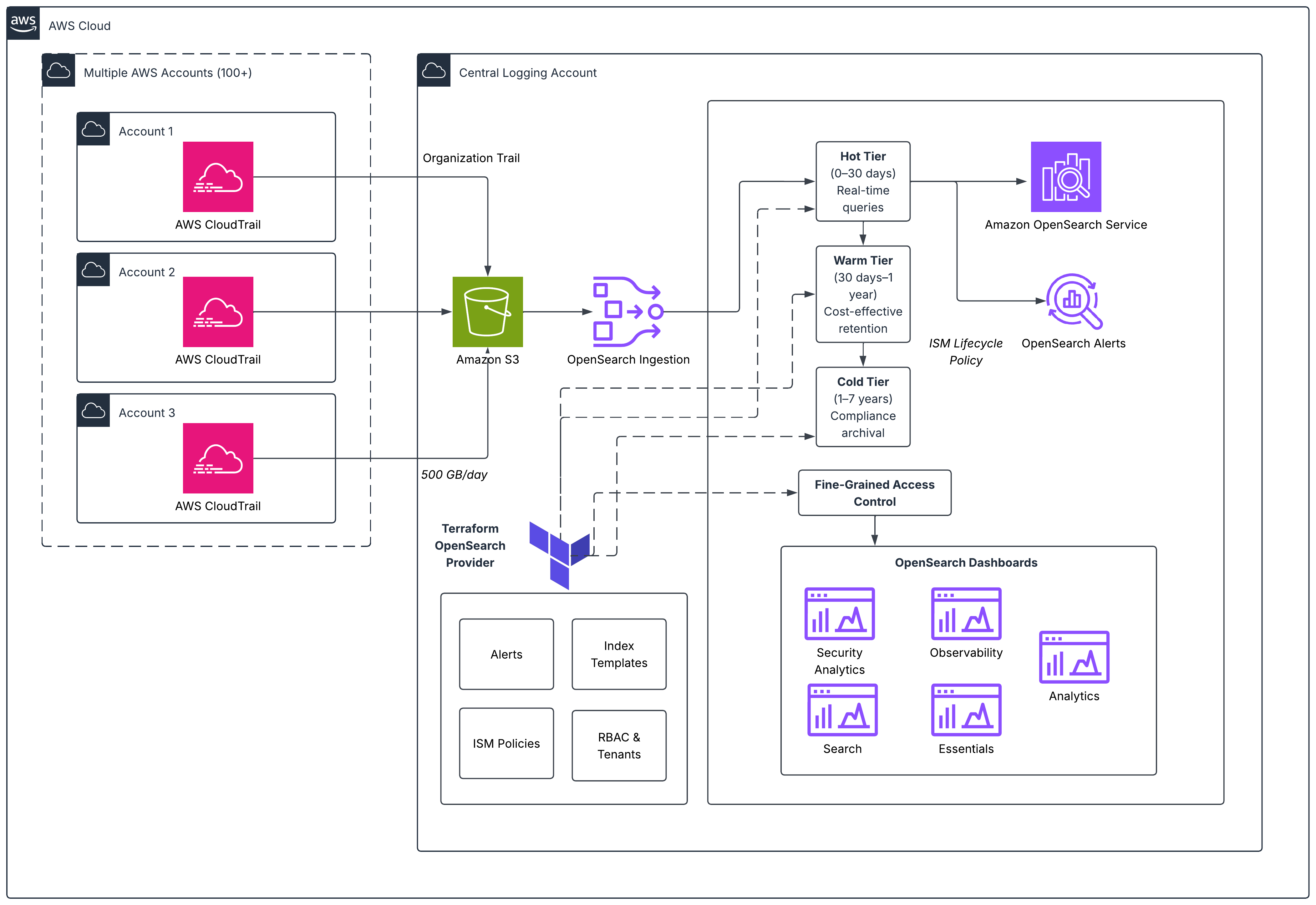
关键组件包括:
- CloudTrail聚合。 组织跟踪将100多个账户的日志发送到集中式Amazon Simple Storage Service(Amazon S3)存储桶。
- 摄取。 Amazon OpenSearch Ingestion管道通过S3存储桶上的Amazon SQS通知拾取新日志。它根据队列深度在2到10个OCU之间自动扩展。较低环境队列上的限制可防止开发和测试峰值饿死生产摄取。
- Amazon OpenSearch Service域。 6个或1.4xlarge数据节点(OpenSearch优化实例)和3个专用r8g.large主节点,具有细粒度访问控制、静态加密和节点间加密。
- 基础设施即代码。 索引模板、索引状态管理(ISM)策略、角色、角色映射、租户、警报监控器和仪表板全部在Terraform中声明,并在环境中一致应用。
前提条件
要实现此解决方案,您需要以下各项:
- 在AWS Organizations中启用CloudTrail并在成员账户中启用的组织。
- Terraform v1.5+及AWS provider和OpenSearch provider。
- 具有用于OpenSearch域的私有子网的虚拟私有云(VPC)。
- 每个将访问OpenSearch域的团队的IAM角色。
- 用于安全警报通知的Amazon Simple Notification Service(Amazon SNS)主题。
- 熟悉Amazon OpenSearch Service、Terraform和AWS CloudTrail。
- 示例Terraform代码可在GitHub存储库
实现
本节逐步介绍解决方案每个组件的Terraform代码,从指导我们大小调整决策的工作负载配置文件开始。
工作负载配置文件
在调整集群大小之前,我们定义了集中式CloudTrail监控平台的工作负载特征和SLA:
| 指标 | 值 |
| 索引吞吐量 | 200 GB/天(约18,000文档/秒) |
| 搜索查询 | 约2,000查询/天(约0.023 QPS) |
| 平均搜索延迟 | < 100 ms(实现:76 ms) |
| 保存的搜索 | 600+ |
| 仪表板和可视化 | 100+ |
| 用户团队 | 4(安全运维、事件响应、合规、DevOps) |
| 保留期 | 30天(热层) |
| 可用性目标 | 99.9% |
这是一个写重的摄取工作负载。主要用例是自动警报和定期合规查询,而不是连续交互式搜索。此工作负载配置文件指导了使用OR1(存储优化)实例和零副本的决策,优先考虑索引吞吐量而非搜索并行性。
域配置
首先配置Amazon OpenSearch Service域,启用加密、细粒度访问控制和VPC放置:
resource "aws_opensearch_domain" "cloudtrail" {
  domain_name    = var.domain_name
  engine_version = "OpenSearch_3.3"

  cluster_config {
    instance_type          = "or1.4xlarge.search"
    instance_count         = 6
    zone_awareness_enabled = true
    zone_awareness_config {
      availability_zone_count = 3
    }
  }

  dedicated_master_config {
    dedicated_master_enabled = true
    dedicated_master_type    = "r6g.large.search"
    dedicated_master_count   = 3
  }

  ebs_options {
    ebs_enabled = true
    volume_type = "gp3"
    volume_size = 500
    iops        = 3000
    throughput  = 125
  }

  encrypt_at_rest { enabled = true }
  node_to_node_encryption { enabled = true }

  domain_endpoint_options {
    enforce_https       = true
    tls_security_policy = "Policy-Min-TLS-1-2-PFS-2023-10"
  }

  advanced_security_options {
    enabled                        = true
    internal_user_database_enabled = false
    master_user_options {
      master_user_arn = var.master_user_arn
    }
  }

  vpc_options {
    subnet_ids         = var.vpc_subnet_ids
    security_group_ids = var.vpc_security_group_ids
  }

  tags = {
    Environment = "production"
    Project     = "centralized-cloudtrail-monitoring"
    ManagedBy   = "terraform"
  }
}
此解决方案基于OR1实例构建,这些实例是存储优化的,使用Amazon Elastic Block Store(Amazon EBS)(gp3或io1)进行本地存储,数据到达时同步复制到Amazon S3。这种存储结构提供了更高的索引吞吐量,因为索引仅在主分片上执行。副本通过段复制由Amazon S3支持,消除了副本节点上文档复制的CPU开销。对于新部署,我们推荐OR2实例,与OR1相比,其索引吞吐量可提高高达26%,同时保持相同的存储优化架构。
摄取管道
Amazon OpenSearch Ingestion管道提供从Amazon S3到OpenSearch域的无服务器自动扩展摄取。它通过集中式S3存储桶上的Amazon SQS通知拾取新的CloudTrail日志,并根据队列深度在2到10个OpenSearch计算单元(OCU)之间扩展:
resource "aws_iam_role" "osis_pipeline" {
  name = "cloudtrail-osis-pipeline-role"
  assume_role_policy = jsonencode({
    Version = "2012-10-17"
    Statement = [{
      Action    = "sts:AssumeRole"
      Effect    = "Allow"
      Principal = { Service = "osis-pipelines.amazonaws.com" }
    }]
  })
}

resource "aws_iam_policy" "osis_pipeline" {
  name = "cloudtrail-osis-pipeline-policy"
  policy = jsonencode({
    Version = "2012-10-17"
    Statement = [
      {
        Action   = ["s3:GetObject", "s3:ListBucket"]
        Effect   = "Allow"
        Resource = [var.cloudtrail_bucket_arn, "${var.cloudtrail_bucket_arn}/*"]
      },
      {
        Action   = ["sqs:ReceiveMessage", "sqs:DeleteMessage", "sqs:GetQueueAttributes"]
        Effect   = "Allow"
        Resource = var.cloudtrail_sqs_queue_arn
      },
      {
        Action   = ["es:DescribeDomain", "es:ESHttp*"]
        Effect   = "Allow"
        Resource = "${aws_opensearch_domain.cloudtrail.arn}/*"
      }
    ]
  })
}

resource "aws_iam_role_policy_attachment" "osis_pipeline" {
  role       = aws_iam_role.osis_pipeline.name
  policy_arn = aws_iam_policy.osis_pipeline.arn
}

resource "aws_cloudwatch_log_group" "osis_pipeline" {
  name              = "/aws/vendedlogs/OpenSearchIngestion/cloudtrail-pipeline"
  retention_in_days = 30
}

resource "aws_osis_pipeline" "cloudtrail" {
  pipeline_name = "cloudtrail-ingestion"
  pipeline_configuration_body = <<-EOT
    version: "2"
    cloudtrail-pipeline:
      source:
        s3:
          notification_type: "sqs"
          codec:
            json:
          compression: "gzip"
          sqs:
            queue_url: "${var.cloudtrail_sqs_queue_url}"
          aws:
            sts_role_arn: "${aws_iam_role.osis_pipeline.arn}"
            region: "${data.aws_region.current.name}"
      processor:
        - date:
            from_time_received: true
            destination: "@timestamp"
      sink:
        - opensearch:
            hosts: ["https://${aws_opensearch_domain.cloudtrail.endpoint}"]
            index: "cloudtrail-%{yyyy.MM.dd}"
            aws:
              sts_role_arn: "${aws_iam_role.osis_pipeline.arn}"
              region: "${data.aws_region.current.name}"
  EOT
  min_units = 2
  max_units = 10
  log_publishing_options {
    is_logging_enabled = true
    cloudwatch_log_destination {
      log_group = aws_cloudwatch_log_group.osis_pipeline.name
    }
  }
  tags = {
    Environment = "production"
    Project     = "centralized-cloudtrail-monitoring"
    ManagedBy   = "terraform"
  }
}该管道使用带有基于SQS通知的S3源插件。当新的CloudTrail日志文件到达S3时,SQS消息触发管道获取并解析它们。min_units和max_units参数控制自动扩展。管道从2个OCU开始,根据队列深度扩展到10个,无需手动干预即可处理摄取峰值。对于较低环境(开发和测试),您可以对Amazon SQS队列应用限制,以防止非生产峰值饿死生产摄取容量。
索引模板
提前定义索引模板,避免日后痛苦的重新索引。以下模板为 CloudTrail 字段设置显式映射,通过异步 translog 持久性优化写入吞吐量,并与 ISM 集成实现自动滚动:
resource "opensearch_index_template" "cloudtrail" {
  name = "cloudtrail-template"
  body = jsonencode({
    index_patterns = ["cloudtrail-*"]
    priority       = 100
    template = {
      settings = {
        number_of_shards                                  = 6
        number_of_replicas                                = 0
        "index.refresh_interval"                          = "10s"
        "index.translog.durability"                       = "async"
        "index.translog.sync_interval"                    = "30s"
        "plugins.index_state_management.rollover_alias"   = "cloudtrail"
      }
      mappings = {
        properties = {
          "@timestamp"        = { type = "date" }
          eventSource         = { type = "keyword" }
          eventName           = { type = "keyword" }
          awsRegion           = { type = "keyword" }
          sourceIPAddress     = { type = "ip" }
          errorCode           = { type = "keyword" }
          errorMessage        = { type = "text" }
          recipientAccountId  = { type = "keyword" }
          userIdentity = {
            properties = {
              type      = { type = "keyword" }
              arn       = { type = "keyword" }
              accountId = { type = "keyword" }
              userName  = { type = "keyword" }
              sessionContext = {
                properties = {
                  sessionIssuer = {
                    properties = {
                      type     = { type = "keyword" }
                      arn      = { type = "keyword" }
                      userName = { type = "keyword" }
                    }
                  }
                }
              }
            }
          }
          requestParameters = { type = "object", enabled = true }
          responseElements  = { type = "object", enabled = true }
        }
      }
    }
  })
}
在数据摄入前定义映射可防止映射冲突,并避免事后重新索引数据。
生命周期管理(ISM 策略)
以下 ISM 策略用单个声明式策略取代自定义 Lambda 函数。滚动操作使用两个 OR 条件:min_index_age 和 min_primary_shard_size。无论先达到哪个阈值都会触发滚动。这既保持分片大小有界,又确保在低流量期间也能及时轮换:
resource "opensearch_ism_policy" "cloudtrail_lifecycle" {
  policy_id = "cloudtrail-lifecycle"
  body = jsonencode({
    policy = {
      description   = "CloudTrail lifecycle - rollover, retain 30d, delete"
      default_state = "hot"
      ism_template  = [{ index_patterns = ["cloudtrail-*"], priority = 100 }]
      states = [
        {
          name    = "hot"
          actions = [{ rollover = { min_primary_shard_size = "30gb", min_index_age = "1d" } }]
          transitions = [{ state_name = "delete", conditions = { min_index_age = "30d" } }]
        },
        {
          name        = "delete"
          actions     = [{ delete = {} }]
          transitions = []
        }
      ]
    }
  })
}
与每个环境的 Lambda 函数相比,此方法将生命周期管理代码减少约 60%,且更改只需一次 terraform apply 即可部署。
注意: 对于每天摄入超过 100 GB 的索引(例如本部署中的 CloudTrail 每天 200 GB),您可以将 min_index_age 覆盖为 12 小时以更频繁地滚动。在 OpenSearch ISM 中,这两个条件是 OR 关系。如果分片在 1 天前达到 30 GB,则按大小滚动。如果在达到 30 GB 前过了 1 天,则按年龄滚动。 多团队访问控制
当多个团队需要对同一数据具有不同访问级别时,请声明式地定义所有角色,并使用 for_each 一致地创建它们。以下示例定义了 4 个具有不同权限的团队角色:
locals {
  team_roles = {
    security_ops = {
      description         = "Security Operations - full read, alert management"
      cluster_permissions = ["cluster_monitor", "cluster:admin/opendistro/alerting/*"]
      index_permissions = [
        { index_patterns = ["cloudtrail-*"], allowed_actions = ["read", "search", "get"] },
        { index_patterns = [".opendistro-alerting-*"], allowed_actions = ["read", "write", "search", "get", "delete"] }
      ]
    }
    incident_response = {
      description         = "Incident Response - full read for investigation"
      cluster_permissions = ["cluster_monitor"]
      index_permissions = [
        { index_patterns = ["cloudtrail-*"], allowed_actions = ["read", "search", "get"] }
      ]
    }
    compliance_auditors = {
      description         = "Compliance - read-only"
      cluster_permissions = []
      index_permissions = [
        { index_patterns = ["cloudtrail-*"], allowed_actions = ["read", "search"] }
      ]
    }
    devops = {
      description         = "DevOps - infra metrics and limited CloudTrail"
      cluster_permissions = ["cluster_monitor"]
      index_permissions = [
        { index_patterns = ["infra-metrics-*"], allowed_actions = ["read", "search", "get"] },
        { index_patterns = ["cloudtrail-*"], allowed_actions = ["read", "search"] }
      ]
    }
  }
}

resource "opensearch_role" "teams" {
  for_each            = local.team_roles
  role_name           = each.key
  description         = each.value.description
  cluster_permissions = each.value.cluster_permissions

  dynamic "index_permissions" {
    for_each = each.value.index_permissions
    content {
      index_patterns  = index_permissions.value.index_patterns
      allowed_actions = index_permissions.value.allowed_actions
    }
  }

  dynamic "tenant_permissions" {
    for_each = [each.key]
    content {
      tenant_patterns = [each.key]
      allowed_actions = ["kibana_all_write"]
    }
  }
}

resource "opensearch_roles_mapping" "teams" {
  for_each      = local.team_roles
  role_name     = opensearch_role.teams[each.key].role_name
  backend_roles = var.team_iam_roles[each.key]
}

resource "opensearch_tenant" "teams" {
  for_each    = local.team_roles
  tenant_name = each.key
  description = "Dashboard workspace for ${replace(each.key, "_", " ")}"
}
此方法将 IAM 角色(而非单个用户)映射到 OpenSearch 角色。添加新团队只需在 locals 块中添加一项并运行 terraform apply。每个团队在 OpenSearch Dashboards 中获得隔离的租户,防止跨团队干扰已保存的搜索、可视化和仪表板配置。我们选择 OpenSearch Dashboards 是因为租户、角色、可视化和已保存对象都可以通过 Terraform OpenSearch provider 以编程方式管理,使整个堆栈处于基础设施即代码治理之下。对于在 Terraform 管理工作流之外构建新可视化的团队,我们推荐 OpenSearch UI。这个下一代分析界面支持多数据源,提供工作区以实现团队隔离,并且在集群升级期间保持可用。
告警
在 Terraform 中定义告警监控器以自动检测安全关键事件。以下监控器捕获 CloudTrail 篡改尝试(StopLogging、DeleteTrail)并通过 Amazon SNS 发送告警:
resource "opensearch_monitor" "cloudtrail_tampering" {
  body = jsonencode({
    name     = "CloudTrail Tampering Detection"
    type     = "monitor"
    enabled  = true
    schedule = { period = { interval = 1, unit = "MINUTES" } }
    inputs = [{
      search = {
        indices = ["cloudtrail-*"]
        query = {
          size = 5
          query = {
            bool = {
              must = [{ terms = { eventName = ["StopLogging", "DeleteTrail",
                "UpdateTrail", "PutEventSelectors", "DeleteEventDataStore"] } }]
              filter = [{ range = { "@timestamp" = { gte = "now-1m" } } }]
            }
          }
        }
      }
    }]
    triggers = [{
      name     = "trail_tampering_detected"
      severity = "1"
      condition = { script = {
        source = "ctx.results[0].hits.total.value > 0"
        lang   = "painless"
      } }
      actions = [{
        name             = "notify_security"
        destination_id   = var.sns_destination_id
        message_template = { source = "CRITICAL: CloudTrail tampering detected." }
      }]
    }]
  })
}
结果与性能
部署解决方案后,我们根据工作负载配置文件中定义的 SLA 测量了稳态性能:
| 指标 | 目标 | 达成 |
| 索引吞吐量 | 200 GB/天 | 200 GB/天持续(约 18,000 文档/秒) |
| 搜索延迟(平均) | < 100 毫秒 | 76 毫秒 |
| 搜索可用性 | 99.9% | 99.95%+(145 天无计划外停机) |
| 告警检测时间 | < 2 分钟 | 约 1 分钟(监控间隔) |
| 合规报告生成 | < 5 分钟 | 通过已保存搜索按需生成 |
关键成果:
- 威胁检测从数小时缩短到数分钟。 自动化告警取代了手动日志搜索。CloudTrail 篡改监控器在事件发生后一分钟内检测到可疑活动。
- 合规报告按需生成。 借助 600 多个已保存搜索和 100 多个仪表板,合规团队在几分钟内即可生成 SOC 2、PCI DSS 和 HIPAA 审计证据,而不是几天。
- 四个团队独立运作。 每个团队在 OpenSearch Dashboards 中拥有自己的隔离租户,防止跨团队干扰已保存搜索和仪表板配置。
- 零自定义 Lambda 函数。 ISM 策略、索引模板和访问控制全部通过 Terraform 声明式管理,消除了之前分散的代码库。
最佳实践
- 在摄入任何数据之前定义索引模板。更改现有索引的映射意味着重新索引。首先正确完成这一步。
- 根据实际摄入速率设置滚动阈值。在每天 200 GB 的情况下,在 30 GB 处滚动保持分片数量可控,同时平衡查询性能。
- 先在低环境测试 ISM 转换。大型索引的热到温冷迁移需要时间。
- 映射 IAM 角色而不是用户。人员会变更团队。角色保持稳定。这简化了访问管理。
- 在 S3 和摄取管道之间放置一个 Amazon SQS 队列。这为您提供每个环境的节流控制,而无需修改管道配置。
- 积极使用
for_each。角色、租户、索引模式和监控器都跨团队或环境遵循模式,因此使用for_each消除复制粘贴漂移。 - 考虑为新的可视化工作流使用 OpenSearch UI。该解决方案使用 OpenSearch Dashboards 管理 Terraform 管理的租户和角色。OpenSearch UI 是一个下一代界面,支持多数据源,在集群升级期间保持可用,并包含用于团队隔离的工作区。它是创建新仪表板和可视化的推荐界面。
可选:通过冷存储扩展以实现更长的保留期
对于有合规要求强制更长保留期的组织(例如,PCI DSS 或 HIPAA 要求 7 年),您可以使用温冷层扩展 ISM 策略。以下示例添加了分层存储,将数据按热、温、冷和删除状态移动:
states = [
  {
    name    = "hot"
    actions = [{ rollover = { min_primary_shard_size = "30gb", min_index_age = "1d" } }]
    transitions = [{ state_name = "warm", conditions = { min_index_age = "30d" } }]
  },
  {
    name = "warm"
    actions = [
      { warm_migration = {} },
      { force_merge = { max_num_segments = 1 } }
    ]
    transitions = [{ state_name = "cold", conditions = { min_index_age = "365d" } }]
  },
  {
    name    = "cold"
    actions = [{ cold_migration = { timestamp_field = "@timestamp" } }]
    transitions = [{ state_name = "delete", conditions = { min_index_age = "2555d" } }]
  },
  {
    name        = "delete"
    actions     = [{ cold_delete = {} }]
    transitions = []
  }
]
温存储使用 force-merge 减少段数量(降低查询开销),而冷存储将数据完全移动到 Amazon S3 以最小化成本。这种分层方法保持热层的高性能,同时满足长期审计要求。
清理
为避免产生持续费用,请通过运行以下命令删除本文中创建的资源:
terraform destroy这将删除 OpenSearch 域、摄取管道、IAM 角色、SQS 队列以及所有相关配置。在运行 destroy 之前,请确保您已导出要保留的任何数据或仪表板。
结论
在这篇文章中,我们向您展示了如何在Amazon OpenSearch Service上使用Terraform管理整个堆栈来构建集中的CloudTrail监控解决方案。该方法从碎片化、手动配置且包含冗余Lambda代码的系统转变为版本控制、同行评审且一致部署的基础设施。
威胁检测时间从数小时降至分钟级,并实现自动化告警。原本需要数天的合规报告现在可按需生成。您的团队可以将时间花在安全分析上,而不是基础设施维护上。
要开始使用,请使用AWS Terraform提供商 aws_opensearch_domain 资源来创建域,然后使用Terraform OpenSearch提供商来管理索引模板、ISM策略、角色和监控器。在索引之前配置您的摄取管道以转换和丰富传入的CloudTrail日志,从而构建一个现代化、可扩展且随组织成长的安全基础。
此解决方案的完整源代码可在GitHub仓库中获取:GitHub仓库
要了解有关此解决方案中使用的服务的更多信息:
这篇内容对你有用吗?
反馈只用于改善内容筛选,不等同于收藏