Unity Gateway CLI:规模化部署与管理编码Agent
DataHot 速览
在模型快速迭代、约每五天出现新前沿模型的背景下,Unity Gateway 推出 CLI,让管理员集中配置编码 Agent 的默认模型、MCP servers、skills、Smart Routing 和支出策略。开发者可用 ug claude 或 ug codex 等命令启动获批 Agent,CLI 负责认证并应用已发布设置。该方案旨在统一跨多家模型供应商的访问、预算、安全策略和使用日志,并支持一次性向所有支持的 Agent 推行新模型或工作流。
为什么值得关注:它把多模型、多编码 Agent 的接入、权限、预算与配置集中治理,对需要内部部署和管理 AI Agent 的数据平台团队有直接参考价值。
本文目录 9 节
- New in Unity Gateway: Configure coding agents centrally and roll them out with ug
- Update agent and model defaults as better options emerge
- Share approved tools and skills across agents
- Match model cost to the task with Smart Routing
- Keep spend on track with budget-aware defaults
- Find and fix wasted spend with tracing
- Get started
- Get the latest posts in your inbox
- Sign up
原文
In the last six months, GPT-6, Claude Opus 5.5, Gemini 3.8, and Grok 4.7 all shipped, alongside strong open-weight models like Kimi K3, GLM-5, and DeepSeek V4.1. There’s a new frontier model roughly every five days, and as the cost-performance frontier keeps moving, the model that was the best choice for a job a few months ago often has a better or cheaper alternative today.
That pace puts the teams that own developer tooling in a squeeze. Standardize on one provider, and you risk missing the better models or lower costs available elsewhere. Support many agents and providers, and you give engineers a real choice, but scatter access, budget controls, security policies, and usage logs across separate systems. What organizations actually need is both: the freedom to adopt the best option whenever it appears, and a consistent way to govern it across thousands of developers.
Today, we're introducing the Unity Gateway CLI to deliver both. In Unity Gateway, admins manage approved models, tools, and spending policies from one place. Developers keep working the way they prefer, launching any approved agent with a command like ug claude or ug codex, while Unity Gateway handles authentication and applies the published settings for them. When a better model or a more efficient workflow emerges, teams roll it out across every supported agent at once. The result is a coding setup that keeps pace with the cost-performance frontier as it moves.
New in Unity Gateway: Configure coding agents centrally and roll them out with ug
Unity Gateway now provides admins with a single place to configure coding agents, including their default models, MCP servers, skills, Smart Routing, and spending policies. Admins can manage these settings in Unity Gateway → Govern → Agent Configuration.
Once admins publish an agent configuration, developers can connect to any supported coding agent with a single command. The Unity Gateway CLI handles authentication, connects the agent to Unity Gateway, and applies the published settings before opening the agent’s familiar interface:
Developers can switch between enabled agents without configuring each one separately. Organizations can deploy ug through device management so everyone starts with the same approved setup, with settings that admins can lock.
“With the Unity Gateway CLI, we can route all coding-agent model and tool traffic through a single governed path while maintaining identity-level attribution and access to approved models and MCP tools. Since rolling it out, our coding agents have generated more than 61 billion input tokens across roughly 360,000 requests, with centralized visibility into usage and spend.” —John Xing, Chief Technology Officer, Concurrence
Update agent and model defaults as better options emerge
As new agents and models become available, admins can choose the setup they want developers to start with and publish it to the entire team with a single configuration change. The next time developers run ug, the CLI automatically syncs the configuration change and launches the recommended agent with the selected model in its familiar interface. Admins can update that choice as quality, cost, and team needs change. They can also set-up more sophisticated policies such as cohort-based roll outs of new models.
Share approved tools and skills across agents
Admins can configure shared MCP tools and skills and make them available through supported agents. Developers gain access to the approved tools and proven workflows within their configured agents, without having to set each one up separately.
Match model cost to the task with Smart Routing
Coding tasks vary in complexity. Admins can enable Smart Routing centrally so simpler work can use less expensive models while harder work gets more capable ones. Developers stay in their preferred coding agents without having to choose the right model for each task. Smart Routing selects a model for the main session and can make a separate choice for work that the agent delegates to a subagent.
In our published Smart Routing evaluation, this approach delivered 35% cost savings on our internal coding benchmark.
Keep spend on track with budget-aware defaults
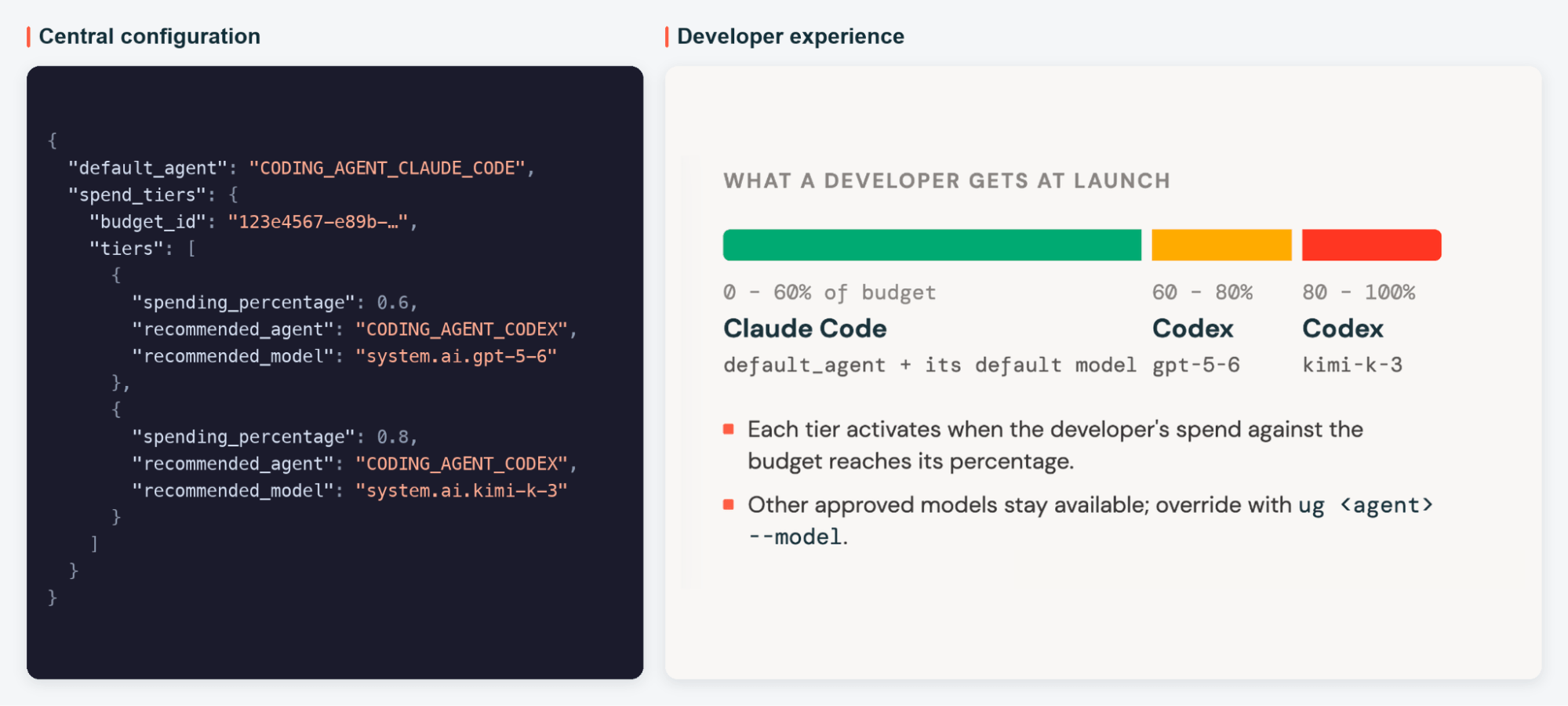
Unity Gateway lets teams recommend lower-cost agents and models as spending reaches defined budget thresholds. These become the defaults for new launches without interrupting ongoing work. Developers can check spending and remaining budget with ug usage.
Find and fix wasted spend with tracing
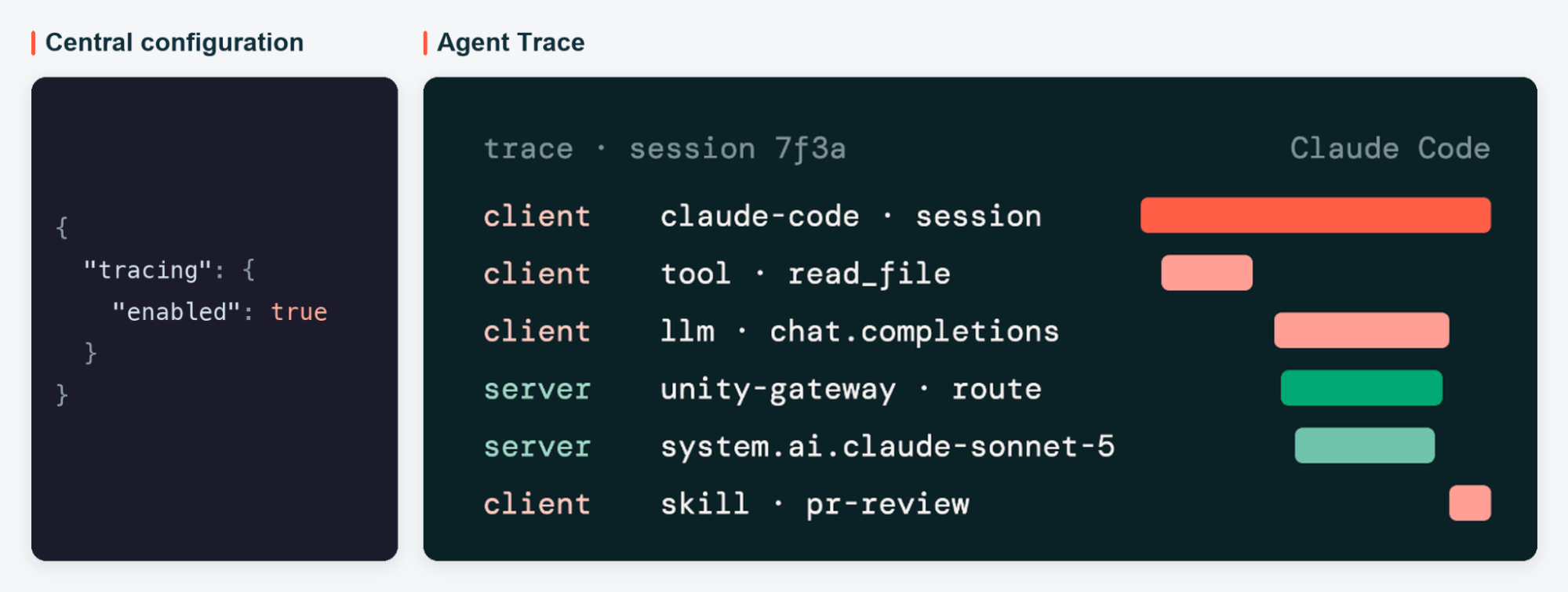
Unity Gateway can capture traces from coding agents, including local tool calls and skill invocations. Admins enable tracing centrally, and ug configures supported clients to export those traces to the lakehouse’s unified trace table. Teams can then use Genie to find repeated tool failures, oversized responses, and other sources of wasted tokens, fix them, and measure the results.
In our own engineering organization, we used Unity Gateway tracing with Genie One to find and fix seven MCP tool bugs, which saved us an estimated $1.2 million per year in wasted AI spend and lost productivity.
Get started
At Databricks, the Unity Gateway CLI helps us roll out new models and cost optimizations across our engineering organization without changing how developers work.
Get started with the Unity Gateway CLI quickstart, or dive deeper by configuring your coding agents in Unity Gateway.
Get the latest posts in your inbox
Subscribe to our blog and get the latest posts delivered to your inbox.
Sign up
这篇内容对你有用吗?
反馈只用于改善内容筛选,不等同于收藏