使用Debezium CDC将实时数据迁移到TiDB
DataHot 速览
本文介绍如何利用Debezium CDC将实时数据迁移到TiDB,覆盖从MySQL、PostgreSQL、Oracle等数据库捕获变更并流式写入TiDB的架构。方案通过Debezium读取源库事务日志,将变更事件发送到Kafka,再经JDBC sink写入兼容MySQL协议的TiDB。初始快照与持续流式同步相结合,实现近零停机迁移。文中以PostgreSQL为例验证了“任意源→Kafka→TiDB”的可复用管道。
为什么值得关注:数据从业者可借鉴Debezium+TiDB构建跨数据库实时同步与迁移管道,理解CDC在数据接入与持续同步中的实践价值。
本文目录 16 节
译文
AI 逐段翻译关键要点
- 对于仅 MySQL 的迁移,使用 TiDB DM。当源不是 MySQL,或者你需要可复用的变更流时,使用 Debezium 和 Kafka。
- 一条管道,任意源。Debezium 从 MySQL、PostgreSQL、Oracle 及其他七种数据库捕获数据;仅源连接器不同。
- 无需专有驱动。TiDB 支持 MySQL 协议,因此 Debezium JDBC sink 通过标准
jdbc:mysql://连接写入。 - 一次设置,完成迁移和流式传输。初始快照为已有行进行种子填充,然后切换到流式实时变更。
- 近乎零停机。已有数据和实时变更以无间隙的流到达。
将数据移入新数据库很少是一次性复制。遗留系统迁移、采用分布式 SQL 数据库、异构数据库迁移或建立分析副本,都面临同样的挑战:你必须移动大量已有数据集,并持续保持同步直至可切换,或无限期流式传输变更,理想情况下近乎零停机。
变更数据捕获(CDC)解决了该问题的两个部分。它不是按计划重新复制表,而是跟踪源数据库的事务日志,并将每次已提交的行级变更流式传输到目标。
Debezium 读取每个支持的数据库的原生事务日志,并将每次已提交的插入、更新和删除转换为 Apache Kafka 上的结构化事件。该变更流是事件驱动架构的自然骨干。服务无需轮询数据库,每个数据变更成为持久、有序的事件。独立消费者订阅该流并自行反应,包括微服务、缓存失效、搜索和向量索引、数据湖以及实时分析。
由于 TiDB 是 MySQL 兼容的,开源 Debezium JDBC sink 连接器通过标准 JDBC 应用流式变更。本指南提供可复用的架构:任意 Debezium 源 → Apache Kafka → Debezium JDBC sink → TiDB,并以 PostgreSQL 示例验证。要使用不同源,仅更改源连接器。
支持的 Debezium 源连接器
Debezium 文档列出了以下源连接器,其中任何一个都可以将此管道导入 TiDB。源之间的唯一区别是数据库上如何启用捕获。对于所有关系型源,传递端(Kafka 到 JDBC sink 到 TiDB)完全相同。
| 源数据库 | Debezium 如何捕获变更 | 连接器文档 |
|---|---|---|
| MySQL | 二进制日志(binlog)ROW 格式 | mysql |
| MariaDB | 二进制日志(binlog) | mariadb |
| PostgreSQL | WAL 逻辑解码(pgoutput) | postgresql |
| Oracle | 通过 LogMiner(或 XStream)的 Redo 日志 | oracle |
| SQL Server | 原生 CDC 变更表 | sqlserver |
| Db2 | SQL 复制(ASN)捕获表 | db2 |
| Informix | 逻辑事务日志 | informix |
| Vitess | VStream(基于 MySQL binlog) | vitess |
| Spanner | 变更流 | spanner |
| CockroachDB | 变更源 | cockroachdb |
解决方案架构
管道有三个逻辑阶段:捕获、传输和传递。每个阶段由专用组件处理。
- 捕获。Debezium 源连接器读取源数据库的事务日志,并将每次已提交的变更转换为结构化变更事件。
- 传输。Apache Kafka 将这些事件持久存储在每个表的主题中,解耦源和目标,支持重放和扇出到多个消费者。
- 传递。Debezium JDBC sink 连接器消费这些事件,并通过 MySQL 协议对 TiDB 应用等效的 INSERT、UPDATE 和 DELETE 语句。
所有连接器作为插件在 Kafka Connect 中运行,Kafka Connect 是管理连接器生命周期、偏移量和重启的工作框架。首次启动时,源连接器对现有数据执行一致的初始快照,然后切换到从快照开始时记录的事务日志位置进行流式传输。现有行和未来变更作为连续、无间隙的流到达。
架构图
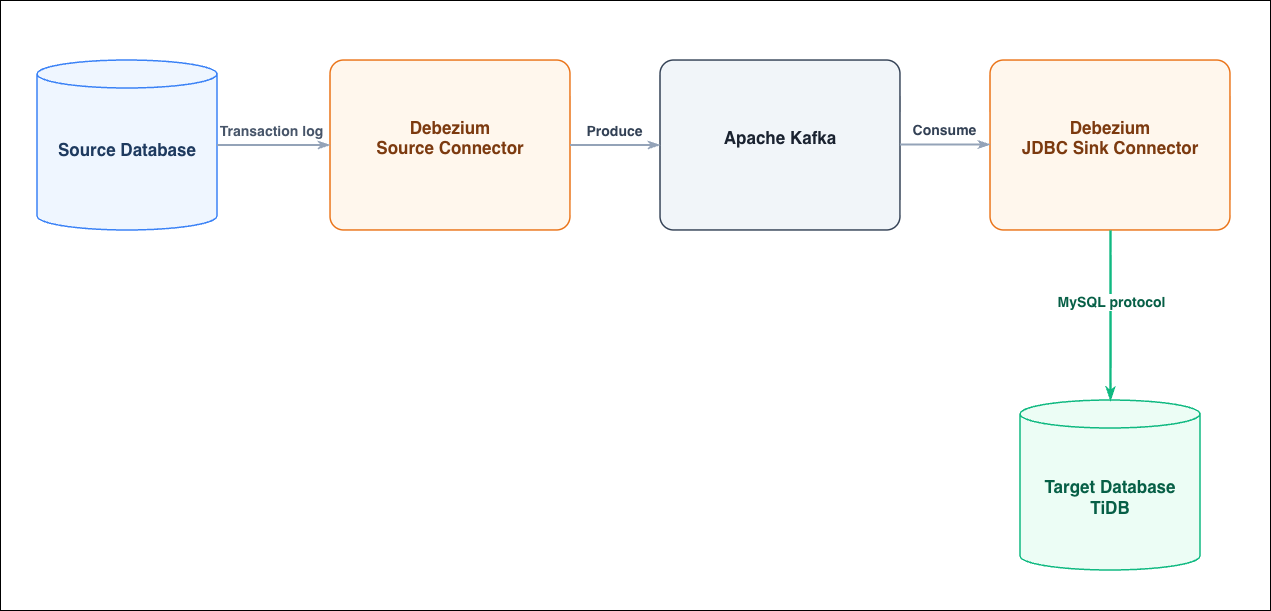
图 1:捕获 → 传输 → 传递管道。只有捕获阶段在源数据库之间变化。
- 源数据库。主数据库系统。必须在其上启用捕获。
- Debezium 源连接器。连接到源,进行初始快照,然后流式传输变更事件。选择匹配你源的连接器。
- Apache Kafka。持久事件骨干。每个捕获的表有自己的主题,用于重放。
- Kafka Connect。托管两个连接器,提供 REST API 用于配置,并持久化偏移量和模式历史。
- Debezium JDBC sink 连接器。将变更应用到 TiDB,并原生理解 Debezium 信封。
- 目标数据库。流式传输目标,TiDB 分布式 SQL 集群。
开始之前
你需要:
- 由 Debezium 连接器支持的源数据库,已启用基于日志的捕获,并具有可读取其变更流的用户。
- TiDB 集群(TiDB Self-Managed 或 TiDB Cloud)在端口 4000 上可达,并具有可创建数据库和表的用户。
- Docker 和 Docker Compose,位于可同时访问源和 TiDB 的主机上。
使用 Debezium CDC 将数据迁移到 TiDB
该示例将 PostgreSQL 表流式传输到 TiDB。要从不同源迁移,请在步骤 3 中更改 connector.class 和源特定的键。其他每个步骤相同。
步骤 1:启动 Kafka 和 Kafka Connect
将其保存为 docker-compose.yml 并启动它。Debezium Connect 镜像已捆绑源连接器和 JDBC sink。
version: '3'
services:
  zookeeper:
    image: quay.io/debezium/zookeeper:2.7
    ports: ["2181:2181"]
  kafka:
    image: quay.io/debezium/kafka:2.7
    ports: ["9092:9092"]
    depends_on: [zookeeper]
    environment:
      ZOOKEEPER_CONNECT: zookeeper:2181
  connect:
    image: quay.io/debezium/connect:2.7
    ports: ["8083:8083"]
    depends_on: [kafka]
    environment:
      BOOTSTRAP_SERVERS: kafka:9092
      GROUP_ID: cdc-demo
      CONFIG_STORAGE_TOPIC: connect_configs
      OFFSET_STORAGE_TOPIC: connect_offsets
      STATUS_STORAGE_TOPIC: connect_statuses
      KEY_CONVERTER: org.apache.kafka.connect.json.JsonConverter
      VALUE_CONVERTER: org.apache.kafka.connect.json.JsonConverter
docker-compose up -d
步骤 2:在源上启用捕获
对于 PostgreSQL,启用逻辑复制并创建 Debezium 可连接和复制的角色:
-- postgresql.conf (self-managed) or DB parameter group (Aurora/RDS PostgreSQL)
wal_level = logical

CREATE ROLE debezium WITH LOGIN REPLICATION PASSWORD '<source-password>';
GRANT SELECT ON ALL TABLES IN SCHEMA public TO debezium;
创建示例表和发布供 Debezium 读取:
CREATE DATABASE cdc_demo;
\c cdc_demo
CREATE TABLE orders (
  id BIGINT PRIMARY KEY, customer VARCHAR(64), amount NUMERIC(10,2)
);
INSERT INTO orders VALUES
  (1,'alice',10.50), (2,'bob',20.00), (3,'carol',33.33);

CREATE PUBLICATION dbz_pub FOR TABLE orders;
步骤 3:配置源连接器
将源连接器配置保存为 source.json。此示例捕获 PostgreSQL。对于其他数据库,更改 connector.class 及其源特定的键。
{
  "name": "src-postgres-cdc_demo",
  "config": {
    "connector.class": "io.debezium.connector.postgresql.PostgresConnector",
    "database.hostname": "<source-host>",
    "database.port": "5432",
    "database.user": "debezium",
    "database.password": "<source-password>",
    "database.dbname": "cdc_demo",
    "topic.prefix": "dbz",
    "table.include.list": "public.orders",
    "plugin.name": "pgoutput",
    "publication.name": "dbz_pub",
    "slot.name": "dbz_slot",
    "snapshot.mode": "initial",
    "decimal.handling.mode": "double"
  }
}
步骤 4:为 TiDB 配置 JDBC sink 连接器
创建目标数据库(sink 自动创建表),然后将 sink 配置保存为 sink.json。由于 TiDB 兼容 MySQL,连接 URL 是一个标准 jdbc:mysql:// URL on port 4000. This step is the same for every source.
mysql -h <tidb-host> -P4000 -uroot -p<tidb-password> -e "CREATE DATABASE cdc_demo;"
{
  "name": "sink-tidb-cdc_demo",
  "config": {
    "connector.class": "io.debezium.connector.jdbc.JdbcSinkConnector",
    "topics": "dbz.public.orders",
    "connection.url": "jdbc:mysql://<tidb-host>:4000/cdc_demo",
    "connection.username": "root",
    "connection.password": "<tidb-password>",
    "insert.mode": "upsert",
    "primary.key.mode": "record_key",
    "primary.key.fields": "id",
    "delete.enabled": "true",
    "schema.evolution": "basic",
    "transforms": "route",
    "transforms.route.type": "org.apache.kafka.connect.transforms.RegexRouter",
    "transforms.route.regex": "dbz\\.public\\.orders",
    "transforms.route.replacement": "orders"
  }
}
Step 5: Register the Connectors
POST both configurations to Kafka Connect, then confirm each reports RUNNING:
curl -X POST -H "Content-Type: application/json" --data @source.json \
  http://localhost:8083/connectors
curl -X POST -H "Content-Type: application/json" --data @sink.json \
  http://localhost:8083/connectors

curl -s http://localhost:8083/connectors/src-postgres-cdc_demo/status
curl -s http://localhost:8083/connectors/sink-tidb-cdc_demo/status
Verify the Initial Snapshot
The snapshot is a one-time step that seeds the target with whatever already exists. As soon as both connectors are running, the source connector’s initial snapshot copies the three existing rows through Kafka and into TiDB. Query the target:
mysql -h <tidb-host> -P4000 -u root -p<tidb-password> \
  -e "SELECT * FROM cdc_demo.orders ORDER BY id;"
The pre-existing rows are already present in TiDB:
+----+----------+--------+
| id | customer | amount |
+----+----------+--------+
|  1 | alice    |   10.5 |
|  2 | bob      |     20 |
|  3 | carol    |  33.33 |
+----+----------+--------+
Debezium applies the snapshot logically to the target database. On the source it reads each existing row with a consistent SELECT and emits it as a change event. The JDBC sink then writes those rows into TiDB as ordinary batched SQL over the MySQL protocol.
For large databases, seed with a native import instead. A logical, row-by-row snapshot is convenient but slow and load-heavy once a table runs to tens of millions of rows or more. In that case, load the pre-existing data with a physical or bulk tool. Export it with the source’s native backup or dump utility and import it into TiDB with IMPORT INTO.
Then let Debezium handle only the ongoing stream. Set the source connector’s snapshot.mode to no_data (capture schema, skip the row snapshot) or never, and align the connector’s start position with the export’s consistency point, the WAL LSN or binlog GTID at which the backup was taken, so no changes are missed between the bulk load and the start of CDC.
Real-Time Changes
Now apply a mix of changes on the PostgreSQL source: an insert, an update, and a delete.
INSERT INTO orders VALUES (4,'dave',44.44);
UPDATE orders SET amount=99.99, customer='alice-updated' WHERE id=1;
DELETE FROM orders WHERE id=2;
Within a few seconds, re-query TiDB. All three change types have propagated:
+----+---------------+--------+
| id | customer      | amount |
+----+---------------+--------+
|  1 | alice-updated |  99.99 |
|  3 | carol         |  33.33 |
|  4 | dave          |  44.44 |
+----+---------------+--------+
Row 4 was inserted, row 1 was updated, and row 2 was deleted, exactly matching the source. The pipeline now streams continuously. Every subsequent committed change on the source appears in TiDB in near real time.
Monitoring and Troubleshooting
Check the health of each connector and its tasks through the REST API. A healthy connector and task both report RUNNING:
curl -s http://localhost:8083/connectors/src-postgres-cdc_demo/status
curl -s http://localhost:8083/connectors/sink-tidb-cdc_demo/status
If a task has FAILED, its status includes the stack trace. You can restart a failed task without recreating the connector:
curl -s -X POST http://localhost:8083/connectors/sink-tidb-cdc_demo/tasks/0/restart
Clean Up
To release resources, delete the connectors and tear down the stack when you are done:
# Remove the connectors
curl -s -X DELETE http://localhost:8083/connectors/sink-tidb-cdc_demo
curl -s -X DELETE http://localhost:8083/connectors/src-postgres-cdc_demo

# Stop and remove all containers and their Kafka state
docker-compose down -v

# Optionally drop the demo databases on the source and on TiDB
#   DROP DATABASE cdc_demo;
Note. docker-compose down -v also deletes the Kafka topics, connector offsets, and schema history. The next start therefore performs a fresh initial snapshot. Preserve the volumes if you want to resume streaming from where you left off. Conclusion
This guide presented one reusable, open-source architecture for streaming real-time change data into TiDB from any of Debezium’s supported source databases. The architecture is a Debezium source connector, Apache Kafka, and the Debezium JDBC sink. Only Step 1, enabling capture, and a few source-specific connector properties change between databases. The transport and delivery into TiDB stay the same. Because TiDB is MySQL-compatible, the JDBC sink delivers changes with no proprietary drivers or adapters, and the same pipeline migrates pre-existing data through Debezium’s initial snapshot. That makes it suitable for both one-time migration and ongoing replication and fan-out.
For a homogeneous MySQL-to-TiDB migration where you do not need Kafka or multiple downstream consumers, consider TiDB’s purpose-built TiDB Data Migration (DM) tool. Choose Debezium and Kafka when your source is not MySQL, or when you want a durable change stream that can also feed search indexes, data lakes, caches, or other services alongside TiDB.
Spin up a MySQL-compatible TiDB Cloud cluster in minutes and point this Debezium pipeline at it today.
这篇内容对你有用吗?
反馈只用于改善内容筛选,不等同于收藏