返回
RSS AWS Big Data Blog 原文 · 未翻译 精选 发布 2026-09-03 02:28

用Apache Iceberg和Flink构建动态流式数据湖

DataHot 速览

本文针对流式管道写入数据湖时上游schema变更带来的运维难题,给出基于Apache Iceberg Dynamic Sink的解决方案。在Amazon Managed Service for Apache Flink上,Flink作业可对记录进行动态路由并自动演进Iceberg表schema,无需重启或手动迁移。文章基于Apache Flink 2.3和Apache Iceberg 1.11.0,展示了DataStream API实现,并附完整GitHub代码。

为什么值得关注:数据湖实时写入场景中schema演进是高频痛点,该文提供了可落地的架构和代码实践,值得数据平台与实时链路从业者参考。

本文目录 11 节
  1. Apache Iceberg dynamic sink
  2. Per-record table routing with DynamicIcebergSink
  3. Automatic schema evolution
  4. Solution overview
  5. Option 1: Infer the schema from the JSON record
  6. Partitioning the routed tables
  7. Option 2: Read the schema from a schema registry
  8. Prerequisites
  9. Deploy and test the solution
  10. Clean up
  11. Conclusion

原文

Handling upstream schema changes is a common operational challenge in streaming data pipelines that write to a data lake. When a source schema changes, teams often face a difficult choice: restart the pipeline or perform a manual migration. A restart can pause ingestion and delay or lose in-flight data. A manual migration consumes engineering time and introduces the risk of schema inconsistencies while the data lake falls behind the source.

For example, consider an Apache Flink job that ingests order_events and writes to an Iceberg table. On Monday, the pipeline runs normally. By Wednesday, the upstream team adds a new loyalty_tier field and introduces a new interaction_events event type. Traditionally, you would need to stop the Flink job, update your schema definitions, and redeploy. With Apache Iceberg’s Dynamic Iceberg Sink on Amazon Managed Service for Apache Flink, the pipeline can handle both changes at the record level without disruption. The DynamicSink routes each event to the right Iceberg table and evolves table schemas as new columns appear, with no operator intervention.

Managed Service for Apache Flink is a fully managed AWS service that you can use to build and deploy streaming applications without setting up infrastructure and managing resources. Apache Flink’s distributed processing engine with exactly once processing guarantees through checkpointing paired with Apache Iceberg’s two-phase commit provides end-to-end consistency without duplications or data loss.

In this post, we show you how to build a dynamic streaming data lake that adapts to new event types and schema changes without stopping the pipeline. Using Apache Flink 2.3 and Apache Iceberg 1.11.0 on Managed Service for Apache Flink, we walk through the DataStream API patterns for per-record table routing and automatic schema evolution. The complete implementation is available in this GitHub repository.

Apache Iceberg dynamic sink

The Dynamic Iceberg Sink allows Flink to dynamically route records to multiple Iceberg tables based on user-defined logic. It also creates and updates tables on the fly and evolves both table schemas and partition specs during streaming execution, controlled through the DynamicRecord class, which eliminates the need for Flink job restarts when requirements change.

Per-record table routing with DynamicIcebergSink

The DynamicIcebergSink resolves the target table at the record level rather than at pipeline configuration time. Records flow through a DynamicRecordGenerator that, for each input, emits one or more DynamicRecord values. Each DynamicRecord carries its own target table ID, schema, partition spec, and row payload, so the sink knows where to write and how the table should look:

DynamicIcebergSink.forInput(events)
    .generator(generator)
    .catalogLoader(catalogLoader)
    .immediateTableUpdate(true)
    .cacheMaxSize(cacheMaxSize)
    .cacheRefreshMs(cacheRefreshMs)
    .append();

The generator receives each record and emits a DynamicRecord targeting a resolved table that looks as follows:

return new DynamicRecord(
    tableId,
    tableBranch,
    icebergSchema,
    rowData,
    partitionSpec,
    distributionMode,
    1);

The sink creates the table if it does not exist and evolves its schema when a record carries new columns. cacheMaxSize and cacheRefreshMs bound the sink’s per-table metadata cache, so a job that writes to many tables does not reload metadata on every record. immediateTableUpdate(true) controls how those catalog changes are applied, which the following section on automatic schema evolution explains. A single Flink job can ingest and route order_events, interaction_events, user_events, and future event types without additional sink definitions.

However, the sink also needs to know what the table looks like. That is why every DynamicRecord also carries the Iceberg schema so that DynamicIcebergSink can create the table on first sight and evolve it as new fields appear. The schema information can be inferred from the data or read from a schema registry.

Automatic schema evolution

Streaming sources add new fields over time, and DynamicIcebergSink handles them without a restart. Before writing each record, it compares the record’s schema against the target table. If the record has a new field, Iceberg adds it as an optional column and commits the change with the next data file. Existing files stay valid and no table rewrite is needed. When you query older files, the new column returns null.

The immediateTableUpdate setting controls where the catalog change happens. The GitHub sample repository sets immediateTableUpdate=true, so the writer subtask that sees the new schema applies the create or alter inline, before it emits the record. This gives the lowest latency but makes more concurrent calls to the catalog. When set to false, records that require a table change take a detour. Records whose table, schema, and partition spec already match the sink’s cached metadata go straight to the writers. Records that do need a change are routed, keyed by table name, to an update operator, so updates for the same table apply one at a time. Once the update commits and the cache refreshes, subsequent records match again and skip the detour. In steady state, with no schema changes arriving, this path adds no extra shuffle. Either way, the schema comparison and the resulting table change are the same.

Schema changes are non-destructive by default. The sink can add new columns, widen existing types (for example, int to long or float to double), relax a required column to optional, and drop columns. Importantly, DynamicIcebergSink does not support renaming columns at the time of writing.

Source schemas are identified in two ways: inferring the schema from source records (for example, JSON inference) and reading serialized records from a schema registry (for example, AWS Glue Schema Registry (GSR)). Schema evolution behavior for the Iceberg sink table depends on the schema source. JSON inference adds any new field it sees, with no contract. For example, this allows the job to initially infer a schema as an integer, and later expand to a long when larger values are detected. Schema registry serialized records define the policy using the registry’s compatibility rules (for example, BACKWARD). This means that incompatible producer changes are rejected when the schema is registered rather than at write time.

The partition spec travels on each DynamicRecord, so the sink applies it when it creates or updates the table. How our sample derives that spec is covered in the partitioning section.

Solution overview

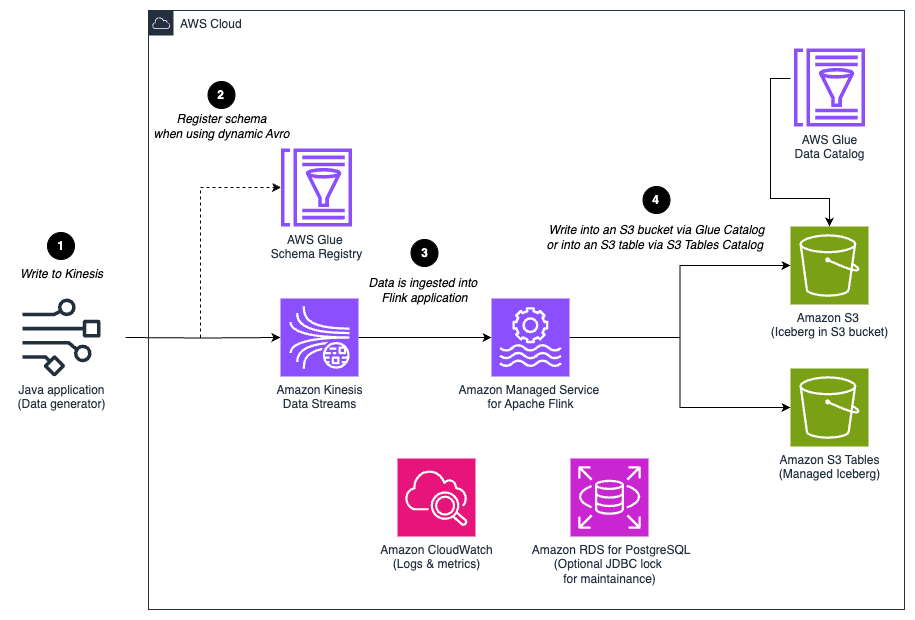
The following diagram illustrates the solution architecture. A data generator (a local Java application) writes events to an Amazon Kinesis Data Stream. In Avro mode it also registers each event schema in the AWS Glue Schema Registry. A Managed Service for Apache Flink application consumes the stream, resolves a target Iceberg table for each record, and writes to Iceberg tables in Amazon S3, cataloged either in the AWS Glue Data Catalog or, for fully managed tables, in Amazon S3 Tables, a capability of Amazon S3.

Data generator sends events to Amazon Kinesis Data Streams, and Managed Service for Apache Flink routes each record to an Iceberg table in Amazon S3

Figure 1: Solution architecture for routing streaming records to per-event Iceberg tables on Managed Service for Apache Flink

At a high level, a single Managed Service for Apache Flink application reads raw records from Kinesis and resolves a target Iceberg table for each record. It uses the DynamicIcebergSink to create and evolve tables on demand. The same job handles many event types because the destination is decided per record, not per sink.

A note on stream topology: the examples assume one Kinesis stream carrying multiple event types, which keeps the walkthrough focused. This is not a requirement for the pattern. If your events arrive on separate streams (for example, one stream per producer or per domain), create one KinesisStreamsSource per stream and union them into a single DataStream before the sink. The routing generator chooses the destination table from the record itself, so many sources can fan into one DynamicIcebergSink and still land in the correct tables.

Unioning does not add shuffle cost. The sink always re-distributes records by an internal per-table writer key, so a unioned stream and N separate pipelines incur the same per-record exchange. The distribution mode each DynamicRecord carries only changes which writer subtask a row lands on, not whether a shuffle occurs. The real tradeoff is isolation. All tables share one writer pool, one commit aggregator, and one committer. A hot stream’s backpressure and checkpoint alignment therefore couple to every other stream, and writer parallelism is a single job-wide setting. Prefer one unioned pipeline when you have many small-to-medium event types that should pool capacity. Split into separate applications when one stream is high-volume enough to need its own writer parallelism and failure isolation.

DynamicIcebergSink needs a schema for every record. The sample provides two interchangeable ways to obtain it, implemented as two generator variants: Option 1 infers the schema from each JSON record at runtime. Option 2 reads the registered schema from AWS Glue Schema Registry. Everything downstream (routing, table creation, and schema evolution) is identical, and only the generator changes.

Option 1: Infer the schema from the JSON record

SchemaAgnosticRoutingGenerator implements Iceberg’s DynamicRecordGenerator. Its generate method maps the routing field to a table name, infers the schema, derives a partition spec, and emits a DynamicRecord through the collector:

@Override
public void generate(JsonNode json, Collector<DynamicRecord> out) {
    String tableName = determineTableName(json); // routing field -> table name
    TableIdentifier tableId = TableIdentifier.of(database, tableName);
    Schema schema = inferSchemaFromJson(json); // cached by schema signature
    RowData rowData = convertJsonToRowData(json, schema);
    PartitionSpec spec = buildPartitionSpec(schema); // cached per schema
    out.collect(new DynamicRecord(
        tableId, "main", schema, rowData, spec, DistributionMode.NONE, 4));
}

The table name comes from an explicit table-name field when present, otherwise from the routing field (event_type by default).

For schemaless or semi-structured JSON, the generator infers an Iceberg schema directly from each record. This is convenient, but inference is fundamentally lossy because JSON does not carry type information. The generator therefore applies deliberately conservative rules and selects a stable type rather than the narrowest one:

JSON valueIceberg type
IntegerLongType (all integral values are widened to long)
StringStringType
Floating-point valuesDoubleType
BooleanBooleanType
ISO-8601 timestampsTimestampType (microseconds)
Nested JSON objectStructType (with fields inferred recursively)
JSON arrayListType (with element type inferred from array contents)

Partitioning the routed tables

Partitioning is decided by our generator, not by the sink, and the same mechanism applies to both schema options: the JSON-inference and schema-registry generators share the partition-candidate logic. The open source DynamicIcebergSink applies whatever PartitionSpec each DynamicRecord carries. Our sample’s SchemaAgnosticRoutingGenerator builds that spec at runtime: it reads a list of candidate partition fields from the partition.candidates application property and derives a per-table spec from the fields it observes. For each table, buildPartitionSpec walks that list and keeps only the candidates present in the table’s schema.

The same list adapts to each table. A table with event_date and region is partitioned by identity(event_date) and identity(region). A table with none of the candidates is created unpartitioned. The resulting spec travels on each DynamicRecord, so the sink applies it when it first creates the table.

For example, with partition.candidates = event_time,region,product: a table whose schema has event_time and product is created partitioned by those two. A table with only event_time gets identity(event_time). A table with none of the candidates is created unpartitioned. Partition specs are not frozen at creation time either: the sink evolves them through Iceberg partition-spec evolution, adding a candidate field when it later appears in the table’s schema and removing one that disappears. This is a metadata-only change, so existing data files keep the spec they were written with.

Two operational practices follow. First, always include your event-time field among the candidates so every table is at least time-partitioned, and monitor for unpartitioned tables through the table’s $partitions metadata or its spec in the catalog: a producer that emits create_timestamp instead of event_time will silently create unpartitioned tables until the candidate list is updated. Second, be deliberate with generic fields like region. If a source produces high-cardinality values for a candidate field, you can correct the spec later. Evolution applies to newly written files only, so the small files already written remain until compaction rewrites them.

Note that the candidate list is global, not per table. It tracks every field you might partition on, and each table takes only the ones it has.

Option 2: Read the schema from a schema registry

Inference is convenient but lossy, and it offers no contract: nothing stops a producer from silently changing a field’s type or meaning. The second option removes the guesswork by reading the schema from a registry instead of the data. Many production streaming platforms standardize on strongly typed Avro schemas managed through AWS Glue Schema Registry. With GSR, producers register schemas explicitly, each record on Kinesis is Avro-encoded and prefixed with a schema-version ID, and the consumer decodes against the exact registered schema. That gives you three things JSON inference cannot: precise types (a long stays a long, a timestamp-micros stays a timestamp-micros), a governed evolution policy enforced at registration, and a single source of truth shared across producers and consumers.

The pattern works with any schema registry that gives consumers the writer’s schema per record. The sample implements it with AWS Glue Schema Registry, but the same generator shape applies to other registries.

The dynamic-sink-avro-sample module applies GSR-managed Avro schemas to the same dynamic routing and schema evolution pattern. For each record, AvroToDynamicRecordGenerator reads the schema-version ID and fetches the writer schema from GSR, caching it after the first lookup. It then converts that schema to an Iceberg schema, decodes the payload into RowData, and emits a DynamicRecord, exactly as the JSON generator does:

The sink wiring is identical to option 1. Only the generator changes, and because the source carries raw Avro bytes the input stream is byte[] rather than parsed JSON:

AvroToDynamicRecordGenerator generator = new AvroToDynamicRecordGenerator(
    awsRegion, registryName, database, partitionCandidates, branch);
DynamicIcebergSink.forInput(eventBytes)
    .generator(generator)
    // identical catalogLoader, immediateTableUpdate(true), cache, and write settings as option 1
    .append();

Because the schema comes from GSR rather than from inspecting bytes, the Avro-to-Iceberg type mapping is exact:

CategoryAvro typeIceberg type
PrimitiveintIntegerType
PrimitivelongLongType
PrimitivefloatFloatType
PrimitivedoubleDoubleType
PrimitivestringStringType
PrimitivebooleanBooleanType
Logicaltimestamp-millisTimestampType (preserves millisecond precision)
Logicaltimestamp-microsTimestampType (preserves microsecond precision)
LogicaldecimalDecimalType
ComplexrecordStructType (nested fields mapped recursively)
ComplexarrayListType (element type inferred from items schema)
ComplexmapMapType (keys are always StringType)

The GSR integration handles schema versioning transparently. As soon as a producer registers a new schema version containing additional fields, the Flink consumer deserializes the updated payload and evolves the Iceberg table to match, with no job restart.

Prerequisites

To follow along, you need the following:

  • An AWS account with permissions to create Amazon Kinesis Data Streams, Managed Service for Apache Flink applications, AWS Glue resources, and Amazon S3 buckets (plus Amazon S3 Tables if you choose that catalog).
  • The AWS Command Line Interface (AWS CLI) configured with credentials.
  • Node.js 18 or later and the AWS Cloud Development Kit (AWS CDK) CLI.
  • Java 17 or later and Apache Maven 3.9 or later, to build the data generator.
  • Docker running locally. The CDK build bundles the Flink application jars inside a Maven image.

Deploy and test the solution

The accompanying repository provisions everything through a single parameterized AWS CDK stack.

cd cdk-infrastructure && npm install
npx cdk bootstrap aws://<account>/<region>
npx cdk deploy -c appType=dynamic -c tableFormatVersion=2 # JSON inference variant
npx cdk deploy -c appType=dynamic-avro -c tableFormatVersion=2 # GSR Avro variant
aws kinesisanalyticsv2 start-application --application-name <ApplicationName> --run-configuration 'ApplicationRestoreConfiguration={ApplicationRestoreType=SKIP_RESTORE_FROM_SNAPSHOT}'
java -jar data-generator/target/data-generator-1.0-SNAPSHOT.jar <stream-name> <region> 100 60 v1
java -jar data-generator/target/data-generator-1.0-SNAPSHOT.jar <stream-name> <region> 100 60 v2
java -jar data-generator/target/data-generator-1.0-SNAPSHOT.jar avro <stream-name> <region> <registry-name> 100 60
  1. Install the CDK dependencies and bootstrap your environment (first time only):
  2. Deploy the variant you want to try: Add -c catalogType=s3tables to either command to use Amazon S3 Tables instead of the AWS Glue Data Catalog. The walkthrough sets tableFormatVersion=2 so you can query the results with a broad range of engines. Omit it to use the default, Iceberg format version 3, when you query with a v3-aware engine such as Spark on Amazon EMR 7.12+ or AWS Glue ETL.
  3. Start the application using the ApplicationName value from the stack outputs:
  4. Send test events with the included data generator. Start with the v1 payloads, which create the tables without the optional fields: Then send v2 payloads, which add the userAgent and scrollDepth fields. This second run is the schema evolution you observe in the next step: For the Avro variant, the generator registers each schema version in the AWS Glue Schema Registry as it sends:
  5. Query the routed tables in Amazon Athena. You should see one Iceberg table per event type appear in the database within a checkpoint interval, and after sending v2 events, the new fields (userAgent, scrollDepth) show up as optional columns on the same tables. The Iceberg metadata tables (for example, SELECT * FROM "db"."table$snapshots") show each commit the sink makes.

Clean up

When you finish testing, delete the resources to stop incurring charges:

cd cdk-infrastructure && npx cdk destroy

CDK removes the Kinesis Data Stream, the Managed Service for Apache Flink application, and the stack-created AWS Identity and Access Management (IAM) roles. Additionally, empty and delete the S3 warehouse bucket to remove the Iceberg data and metadata files, delete any schemas the Avro variant registered in the AWS Glue Schema Registry, and delete the table bucket contents if you used the S3 Tables catalog.

Conclusion

With Apache Iceberg 1.11.0 and Flink 2.3, you can build streaming data lake architectures that adapt to change without stopping the pipeline. With per-record routing, a single Flink application can write multiple event types to separate Iceberg tables, while automatic schema evolution keeps table definitions aligned with changing source data. Choosing AWS Glue Schema Registry over runtime JSON inference adds precise types and a governed evolution contract, and a configurable partition-candidate list keeps each routed table partitioned correctly without pre-declaring its schema.

The result is fewer pipeline redeployments, reduced operational overhead, and a data lake that remains synchronized with evolving application schemas.

To get started, follow the deploy and test section, then adapt the routing field and partition candidates to your own event types.

The full sample code is available in the accompanying GitHub repository.

这篇内容对你有用吗?

反馈只用于改善内容筛选,不等同于收藏

分享这条资讯
分享海报
保存图片
iOS 也可以长按图片保存